
Listener recording feature
Listener recording is a feature that records users who leave comments during a stream.
Once recorded, a user's comment count, gift sends, and other stats accumulate across multiple streams.
How to record
Turn on "Persist" within the stream.
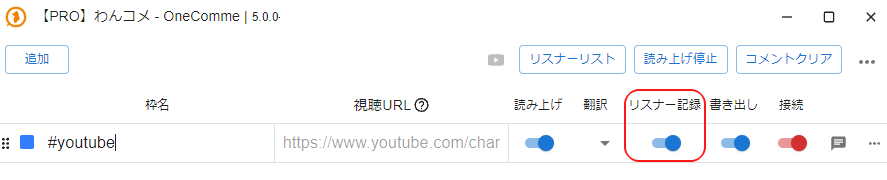 AddStream NameStream URLCommentersSpeechTranslateStop speechPersistClear commentsConnect
With this enabled, once you connect and start receiving comments, user data will be recorded automatically.
Checking recorded data
You can check recorded user data from Commenters.
 AddStream NameCommentersStop speechClear commentsStream URLSpeechTranslatePersistExportConnect
Recorded users appear in the "Listener list tab" within "Commenters".
Types of listener lists
There are two kinds of listener lists: the per-stream list, and the list recorded via listener recording.
Per-stream list
The per-stream list groups viewers by individual stream.
This list is cleared when OneComme is closed.
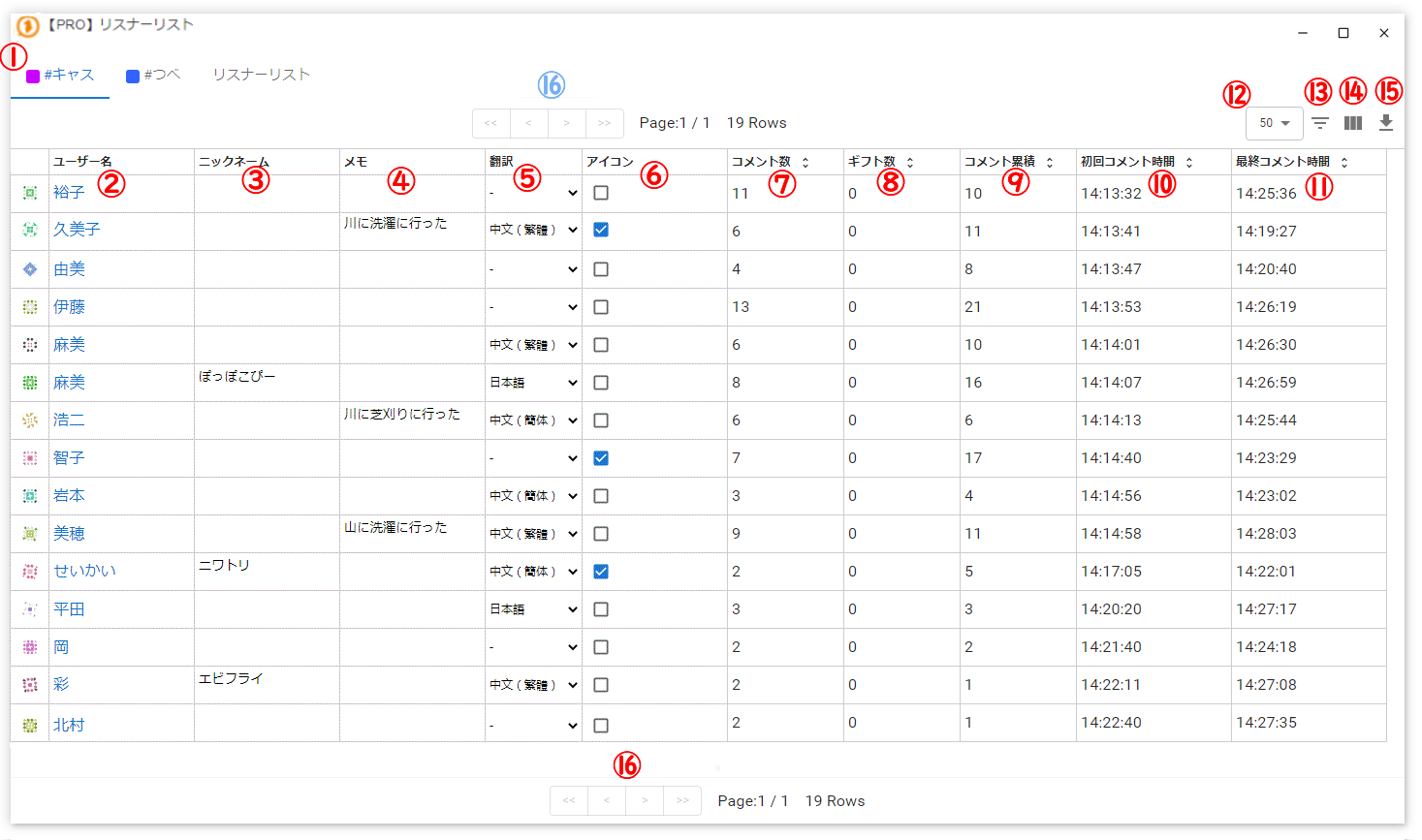 PRO] CommentersCasUsernameCorrect!CommentersNicknaNotesWent to the river to do laundryWent to the river to mow grassWent to the mountain to do laundryChickenFried ShrimpChinese (Simplified)♥mouthIconComments Count (Total)First Comment TimeLast Comment Time
| ① Stream tabs | Switch between streams |
| ② Username | Click to open a window where you can enter a nickname or note |
| ③ Nickname | Assign a nickname to a commenter. The nickname can be used for on-screen display as well as for speech |
| ④ Note | Add a note to a commenter |
| ⑤ Translation | If integrated with translation software, specifying a language will automatically translate this commenter's comments |
| ⑥ Icon | Allow displaying the viewer's icon image (if not allowed, a plain circle icon with the first two characters of the viewer's name is shown instead of the image) |
| ⑦ Comments Count | The number of comments posted while connected to this stream |
| ⑧ Gifts Count | The number of gifts sent while connected to this stream |
| ⑨ Comments Count (Total) | When "Persist" is enabled, this shows the cumulative comment count from past streams |
| ⑩ First comment time | The time this viewer first commented on this stream |
| ⑪ Last Comment Time | The time this viewer last commented on this stream |
| ⑫ ▼ | Select how many users to display per page |
| ⑬ (horizontal three lines) | Filter the listener list by condition |
| ⑭[][][](vertical three lines) | Toggle the visibility of each column |
| ⑮ ⇩ (download icon) | Export the listener list as CSV |
| ⑯[<<l < l > l>>] | Pagination When there are many listeners, you can switch between pages |
Recorded list
A list of viewers recorded via "Persist" in the stream settings.
While "Persist" is on, receiving comments records data such as cumulative comment and gift counts.
If listener recording data remains for a viewer, that viewer's first comment in a new stream is tagged with a "returning" label.
Time since last comment
When a viewer with existing listener recording data posts their first comment (NEW) in a new stream, the approximate elapsed time or number of days since their previous comment is displayed.
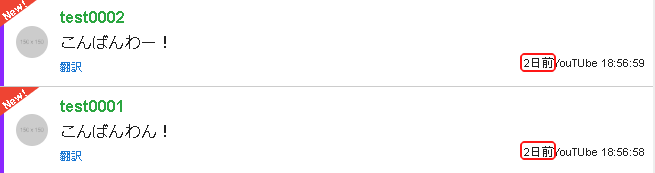 Good eveningGood evenwoof2 days ago YouTube 18:56:592 days ago /ouTube 18:56:58
- Not shown if there is no listener recording data, or if the comment is not the first (NEW) comment since connecting.
Deleting a listener
Check the checkbox on the right side of the listener list entry for the user you want to delete.
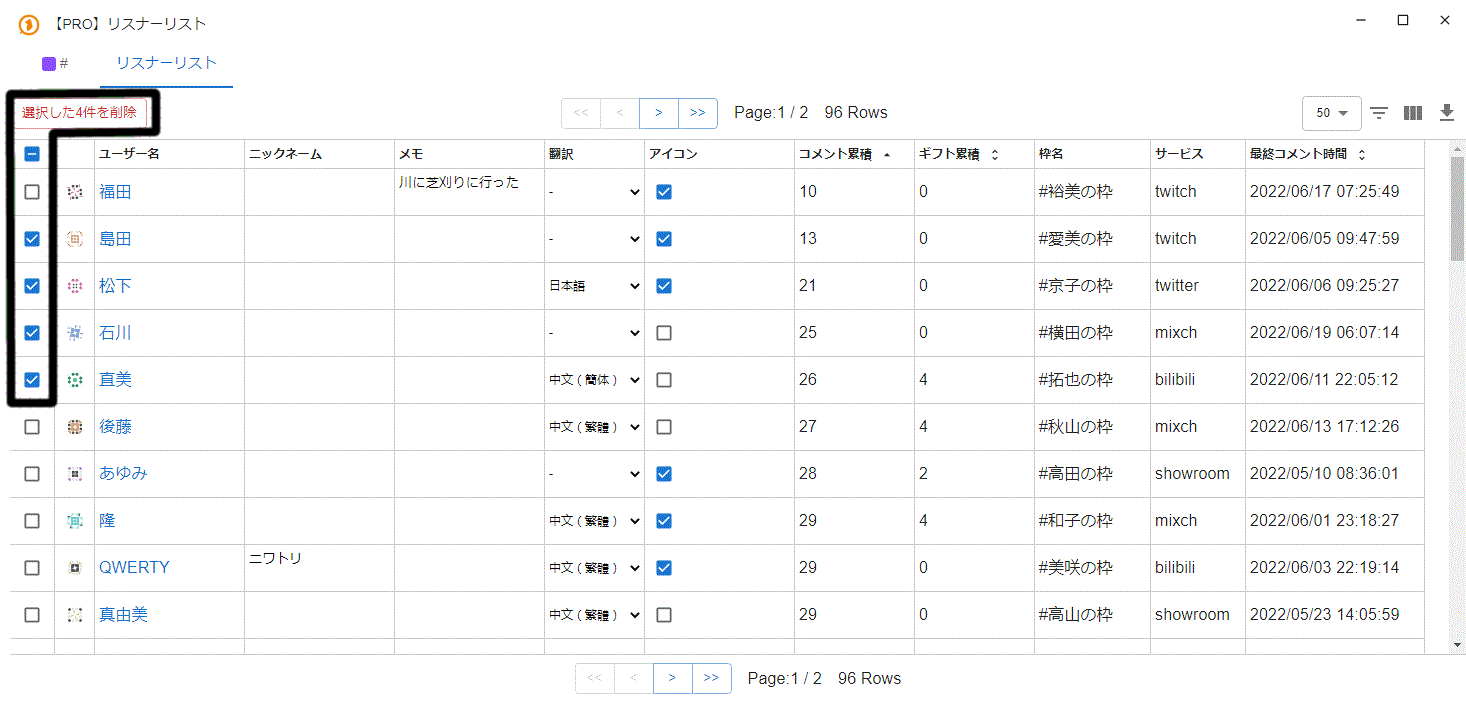 PRO] CommentersCommentersDelete 4 selectedUsernameMayumiNicknameNotesWent to the river to mow grassTranslateIconComments Count (Total)Gifts Count (Total)Stream NameHiromi's streamAimi's streamYokota's streamTakuya's streamAkiyama's streamTakada's streamKazuko's streamMisaki's streamServicesTwitchTwitchLast Comment Time
Then click the "Delete N selected" button to delete the recorded user data.
Listener settings (when clicking a listener name)
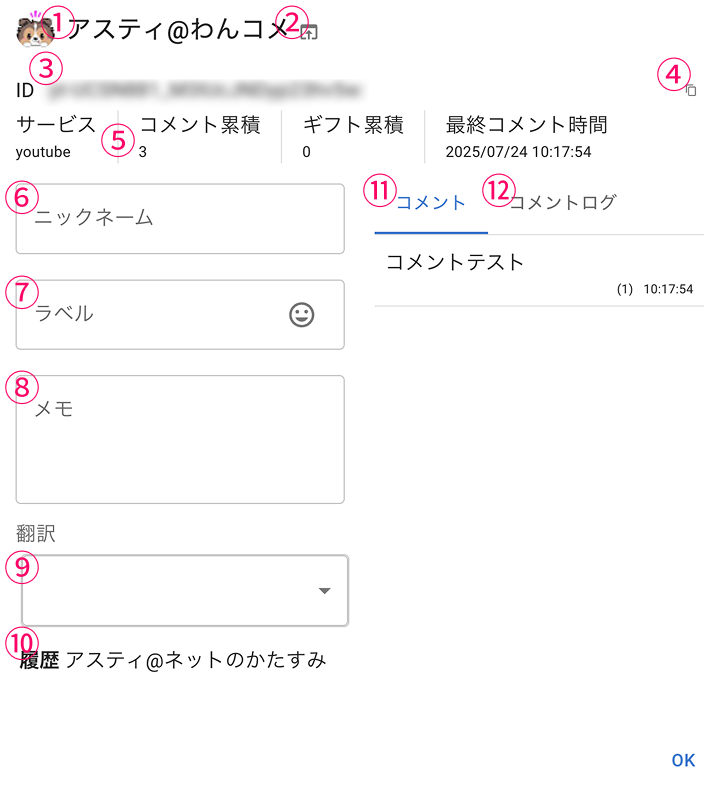 Astie@WanConServicesComments Count (Total)Gifts Count (Total)NicknameLast Comment TimeCommentsComment LogComment testNewcomer/RepeaterNotesTranslate
| ① Listener name | The listener's profile icon and name |
| ② Open page | Opens this listener's user page on their streaming platform |
| ③ Listener ID | A unique ID within OneComme Used when blocking or excluding from speech |
| ④ Copy | Copies the listener ID to the clipboard |
| ⑤ Other information | Basic information such as the streaming platform and totals |
| ⑥ Nickname | An optional name you can assign to the listener Can also be used for display or speech |
| ⑦ Label | You can assign an arbitrary label to the listener |
| ⑧ Note | Freely write notes about the listener |
| ⑨ Translation | If translation integration is enabled, you can set translation options individually for this listener |
| ⑩ History | If a name change is detected, it is kept as history |
| ⑪ Comments | A list of comments this listener has posted that OneComme is currently receiving |
| ⑫ Comment Log | If comment logs are being kept, a list of previously recorded comments is shown |
| Comment | Shows the comments this listener has sent |
Once a label is assigned, it is displayed before the name.
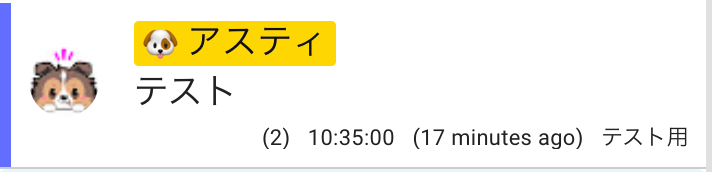 AstieTest
TIPS
Combining this with BouyomiChan's tag feature, for example, lets you apply speech settings individually per listener.
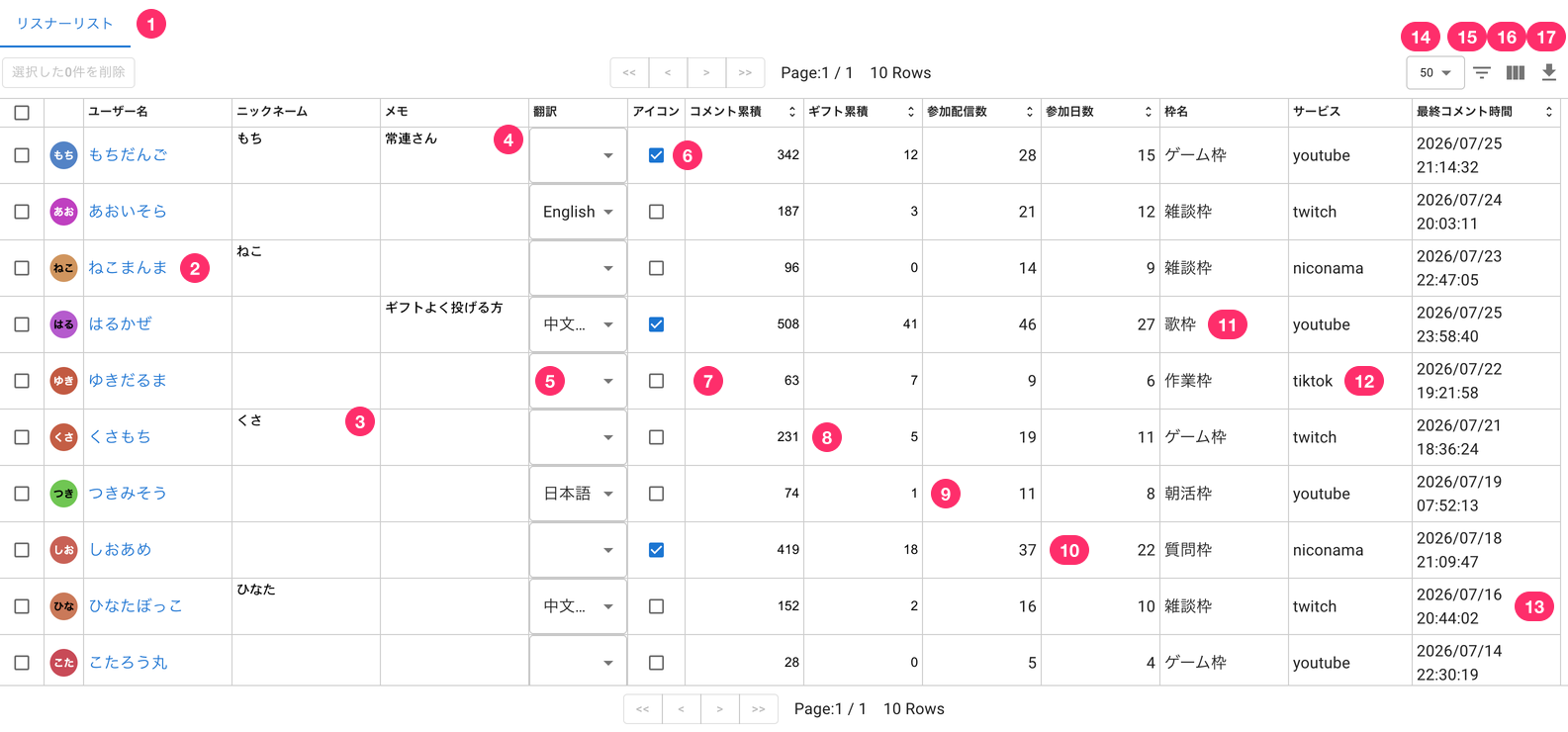 CommentersDelete 0 selectedUsernameMochi DangoBlue SkyNeko ManmaSpring BreezeSnowmanKusamochiEvening PrimroseSalt CandySunbathingKotaro-maruNicknameMochiNekoKusaHinataNotesRegularTop gift sendersJapaneseIconComments Count (Total)Gifts Count (Total)Number Of Participating StreamsNumber Of Days Of Participation6 Work stream11 Game stream4 Game streamServicesTwitchTwitchTwitchLast Comment Time
Cumulative list
| ① Listener list tab | Listener list tab |
| ② Username | The user's name. Check the box on the left to delete the selected user's data. Click to open a window where you can enter a nickname or note |
| ③ Nickname | Assign a nickname to a commenter. The nickname can be used for on-screen display as well as for speech |
| ④ Note | Add a note to a commenter |
| ⑤ Translation | If integrated with translation software, specifying a language will automatically translate this commenter's comments |
| ⑥ Icon | Allow displaying the viewer's icon image (if not allowed, a plain circle icon with the first two characters of the viewer's name is shown instead of the image) |
| ⑦ Comments Count (Total) | The cumulative number of comments posted across all connected streams so far |
| ⑧ Gifts Count (Total) | The cumulative number of gifts sent across all connected streams so far |
| ⑨ Streams joined | The cumulative number of streams this viewer has joined so far (counted each time the stream changes) |
| ⑩ Days joined | The cumulative number of days this viewer has joined a stream (counted on the first comment after the date changes) |
| ⑪ Stream name | The name of the stream where this user last commented |
| ⑫ Service | The streaming platform where the comment was posted |
| ⑬ Last Comment Time | The date and time this user last commented |
| ⑭ ▼ | Select how many users to display per page |
| ⑮ (horizontal three lines) | Filter the listener list by condition |
| ⑯[][][](vertical three lines) | Toggle the visibility of each column |
| ⑰⇩(download icon) | Export the listener list as CSV |