
Setlist
Create and manage a list of songs for singing streams and similar content
You can manage, edit, and display a setlist for use in singing streams and similar content
Song databases can be exported and imported, so you can share song databases with others or receive them from others
With the request feature, you can accept song requests from comments
Registering songs
First, register the songs you want to add to the setlist in the database
Select the database to register to, then enter the song title and other information to register it
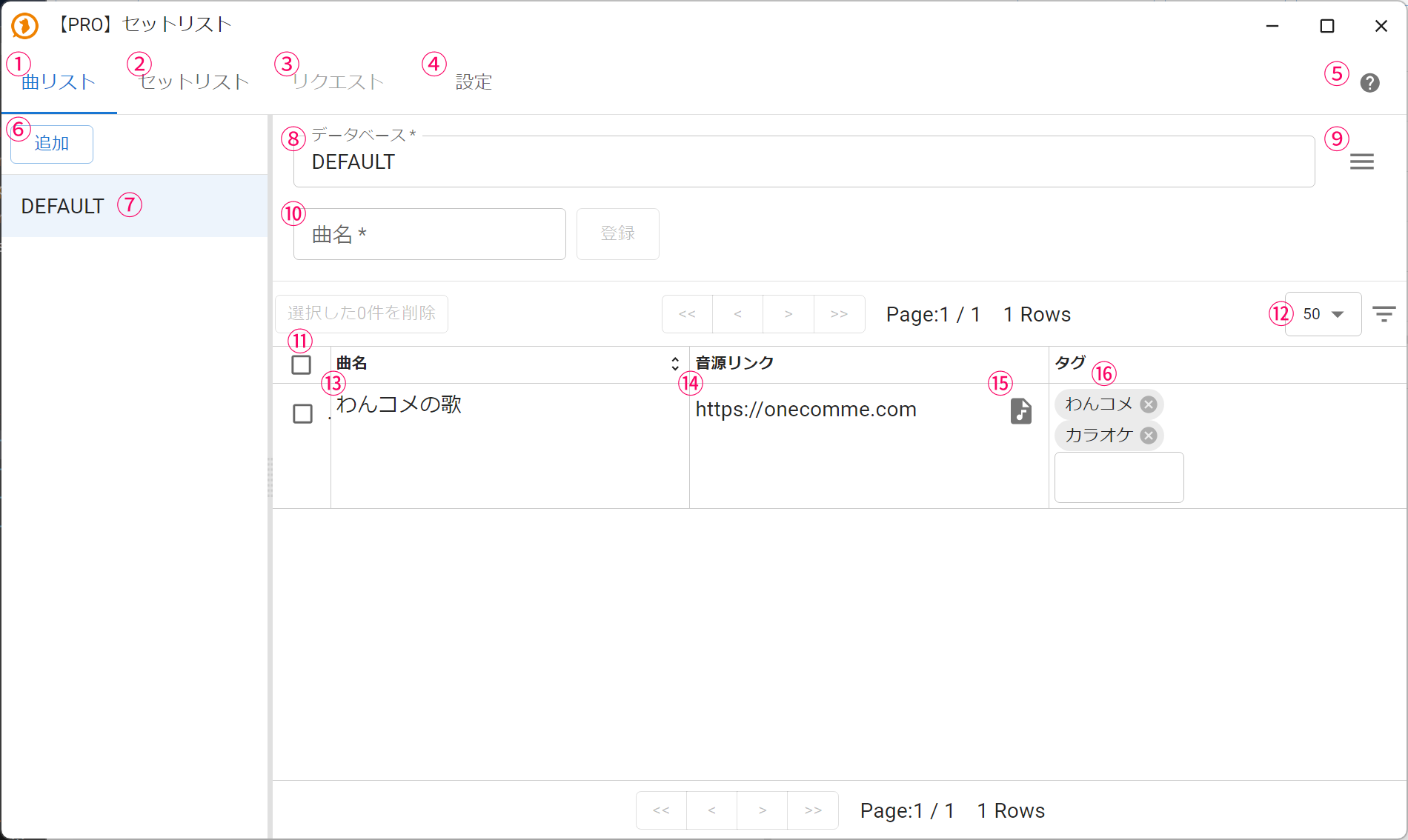 [PRO] SetlistSetlistSetlistAddRequestDatabasesSettingsTitleDelete 0 selectedOneComme SongAddLinkOneComme
| ①Setlist | Displays the song database management screen |
| ②Setlist | Displays the setlist management screen |
| ③Request | Displays the request management screen |
| ④Settings | Displays the settings screen for the entire setlist feature |
| ⑤Help | Opens the setlist manual (this page) |
| ⑥Add | Adds a new song database |
| ⑦Song database | The song databases that have been created Click to open the edit screen |
| ⑧Database name | The name of the song database |
| ⑨Database operation menu | Opens the menu for operations on the database (export, import, delete) |
| ⑩Song title | Enter and register the title of a new song |
| ⑪Checkbox | Lets you delete selected songs in bulk |
| ⑫List options | Lets you change the number of items shown at once or filter songs |
| ⑬Song title | The title of a registered song |
| ⑭Link | You can register a URL link to the audio source Once registered, you can open the link with one click from the setlist |
| ⑮File reference | You can register a local audio file Once registered, you can open the audio file with one click from the setlist |
| ⑯Tags | You can add tags to a song |
Database operation menu
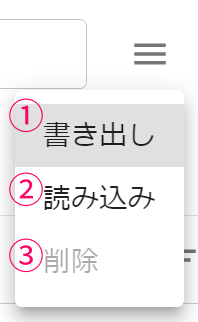 ExportImportRemove
| ①Export | Exports the song database data to a file |
| ②Import | Reads the file exported in ① and registers it to the database |
| ③Delete | Deletes the database (the default database cannot be deleted) |
Creating a setlist
Click "②Setlist" in the screen above to open the setlist management screen
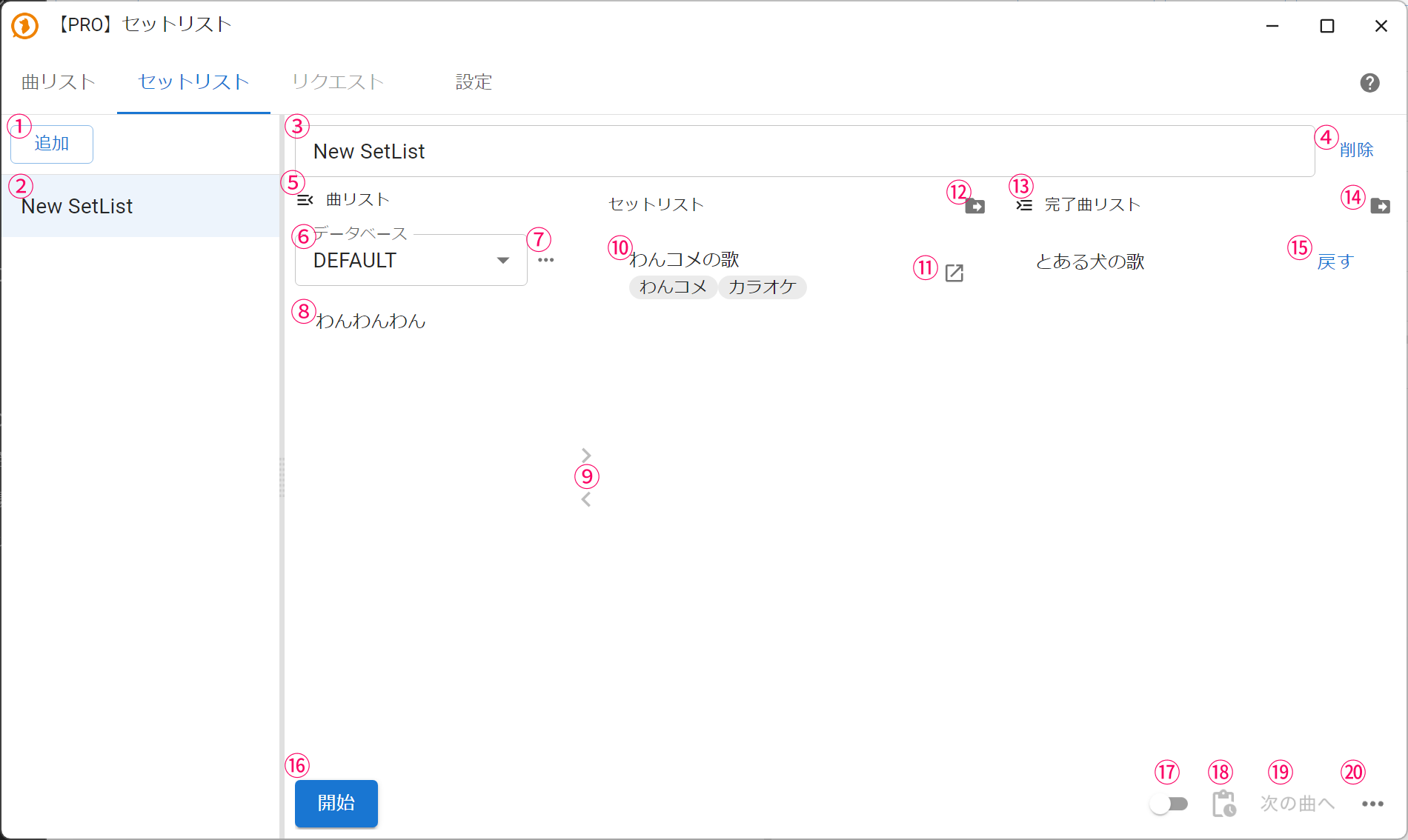 SetlistAdd[PRO] SetlistSetlistRequestDatabaseWoof Woof WoofSettingsSetlistStartCompleted ListA Certain Dog's SongRemoveReturnNext
| ①Add | Creates a new setlist |
| ②Setlist list | A list of the setlists that have been created Click to open the edit screen |
| ③Setlist name | Lets you edit the name of the current setlist |
| ④Delete | Deletes the current setlist |
| ⑤Collapse song list | Lets you collapse and hide the song list |
| ⑥Switch database | Lets you switch the song database you want to add songs from to the setlist |
| ⑦Song list menu | Lets you perform operations on the song database (add song, search) |
| ⑧Songs | A list of songs in the song database (songs already added to the setlist are not shown) You can drag and drop songs to add them to the setlist |
| ⑨Move song | When a song is selected, lets you add or remove it from the setlist |
| ⑩Songs in the setlist | The songs registered in the setlist |
| ⑪Open song link (file) | Opens the link or file for the song data |
| ⑫Setlist template | Drag and drop into the streaming software to add the setlist's song list to it |
| ⑬Collapse completed songs | Lets you collapse and hide the list of completed songs |
| ⑭Completed songs template | Drag and drop into the streaming software to add the setlist's completed songs list to it |
| ⑮Restore | Moves a completed song back to the setlist |
| ⑯Start | Starts the setlist Once started, you can switch to the next song in the setlist one after another |
| ⑰Automatic timestamps | When enabled, automatically sends a timestamp to the Timestamps feature whenever the current song changes |
| ⑱Timestamps | Manually sends a timestamp with the current song title to the Timestamps feature |
| ⑲Next | Moves the current song in the setlist to completed and switches to the next song |
| ⑳Other setlist operations | Lets you perform setlist operations (restore all completed songs) |
Request
You can accept and record song requests from comments, and search for or add songs
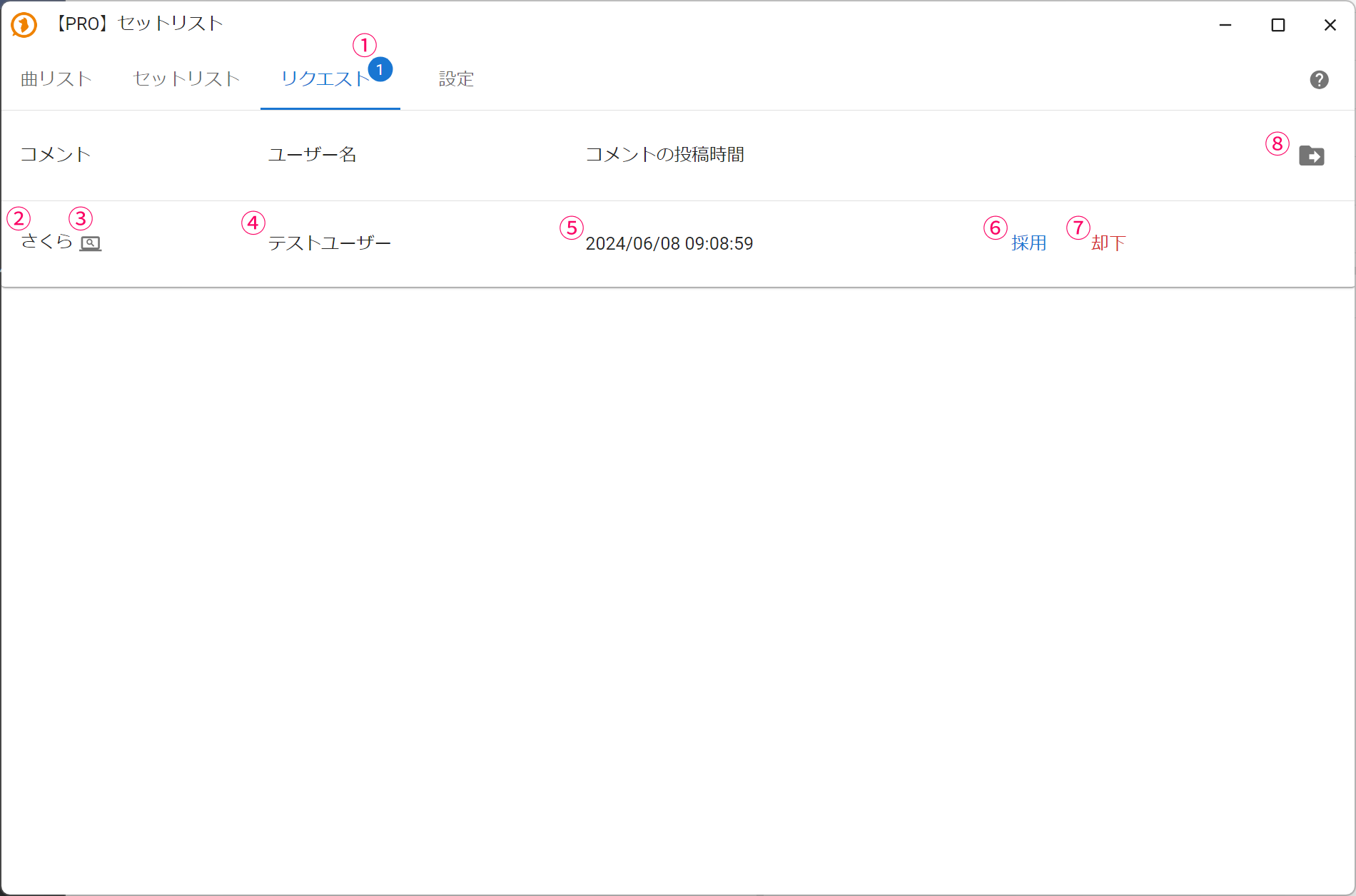 [PRO] SetlistSetlistSetlistRequestCommentsUsernameTestUserSettingsTimestamp
| ①Request count | Shows the number of unhandled requests |
| ②Comment | The content of the request comment |
| ③Search | Searches for the song title using the search site registered in settings |
| ④Username | The name of the commenter |
| ⑤Comment posted date/time | The date and time the request was made |
| ⑥Accept | Accepts the request Opens the following accept dialog |
| ⑦Reject | Rejects and deletes the request |
| ⑧Drag and Drop this into OBS scene | Drag to add a text template to OBS |
Accept dialog
The dialog that opens when accepting a request
In the accept dialog, you can register a new song or select one from the existing song list to add it to the setlist
■ New registration
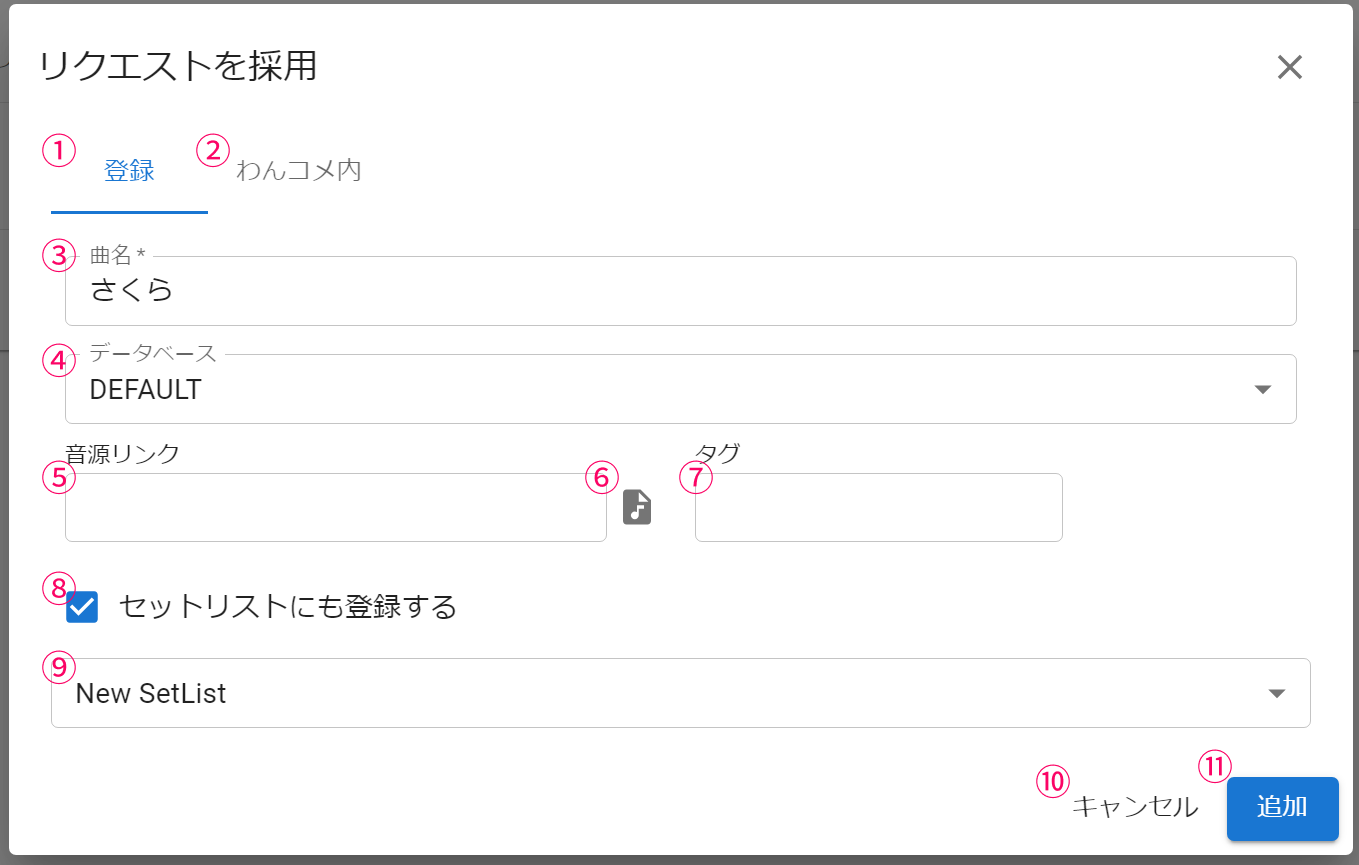 Accept requestAddTitleSakuraDatabasesLinkin OneCommeAdd also to setlistAdd
| ①Register | Select this when registering the requested song as a new song |
| ②in OneComme | Select this when you want to look for the requested song in the song database |
| ③Song title | The title of the song to register |
| ④Database | The song database to register it to |
| ⑤Audio link | The URL of the audio source |
| ⑥Audio file | If the audio data is on your PC, you can select the file |
| ⑦Tags | Add tags to the song |
| ⑧Also add to setlist | Adds the song to the setlist at the same time as registering it |
| ⑨Setlist to register to | Selects the setlist to add the song to |
| ⑩Cancel | Cancels accepting the request |
| ⑪Add | Registers the requested song |
■ in OneComme (search)
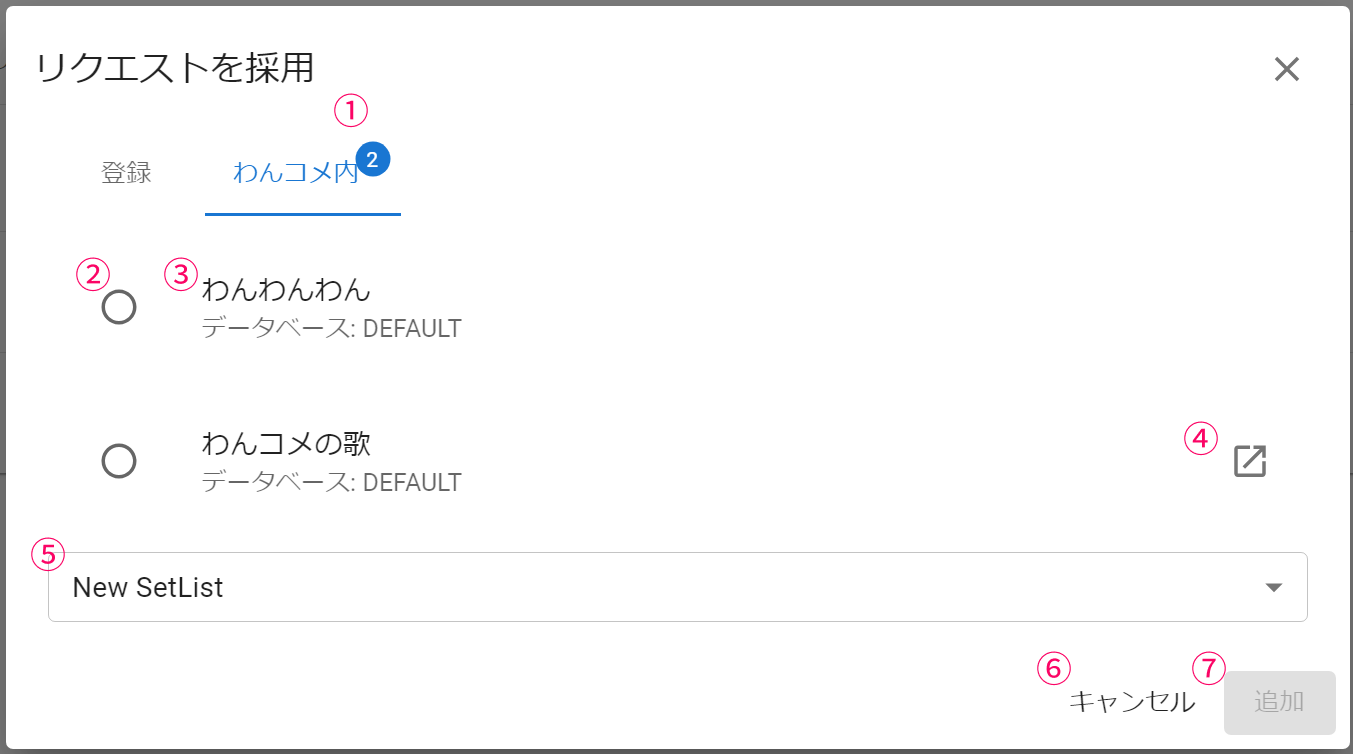 Accept requestAddin OneCommeWoof Woof WoofDatabase: DEFAULTOneComme SongDatabase: DEFAULTCancelAdd
| ①in OneComme search | Searches the song database for similar song titles and shows the number of matches |
| ②Select | Selects the song to add to the setlist |
| ③Song title | A song judged to be close to the requested song |
| ④Audio link | Opens the audio source registered in the song data |
| ⑤Setlist | Selects the setlist to add the song to |
| ⑥Cancel | Cancels accepting the request |
| ⑦Add | Adds the song selected in ② to the setlist selected in ⑤ |
Settings --
 [PRO] SetlistSetlistSetlistSetlistTemplates for OBSColumnCompleted ListTemplates for OBSSearchThresholdRequestSettingsAmbiguityColumnAscending(Older first)Descending(Newly first)URL format for searchRequestRequest wordsRequestRequestTargetAllComment ringtoneExcluded users
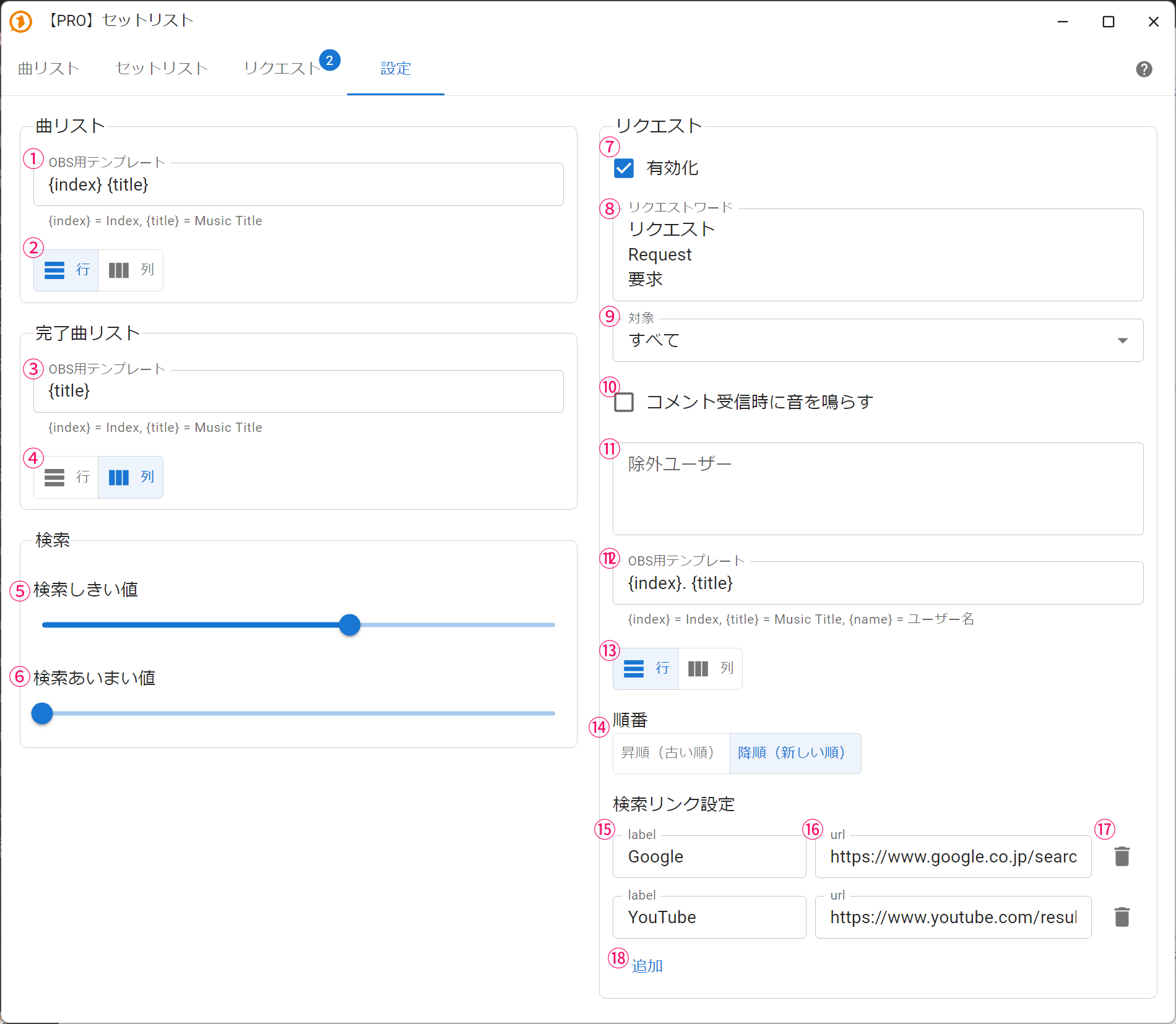
| ①Song list template | Specifies the content to display in the song list template {index}: song number, {title}: song title |
| ②Song list display format | Lets you switch the song list template between row and column display |
| ③Completed songs list | Specifies the content to display in the completed songs template {index}: completed number, {title}: song title |
| ④Completed songs display format | Lets you switch the completed songs template between row and column display |
| ⑤Search threshold | Lets you set how strict a match needs to be to count as a hit during registration or fuzzy request searches (0: almost always a hit ⇔ 1: exact match only) |
| ⑥Search fuzziness | Lets you specify how much character position deviation is allowed in fuzzy search At 0, character positions must match exactly; at 1, a one-character deviation is allowed |
| ⑦Enable requests | Enables accepting requests from comments |
| ⑧Request words | If a comment starts with a request word, it is treated as a request You can specify one word per line |
| ⑨Target | Lets you restrict who requests are accepted from - Membership users (YouTube) - Channel Points users (Twitch) - Subscribers (Twitch) - Non-anonymous - Anonymous |
| ⑩Notification sound | Lets you play a sound when a request comment is received |
| ⑪Excluded users | Comments from the specified users will no longer be treated as request comments (e.g. bots) You can specify one username per line |
| ⑫Requested song template | Specifies the content to display in the request template {index}: request number, {title}: requested song title, {name}: username of the requester |
| ⑬Requested song display format | Lets you switch the request template between row and column display |
| ⑭Order | The order in which items are displayed in the requested song template |
| ⑮Search link label | The name of the search site used for song searches when requesting |
| ⑯Search URL | The URL used for song searches when requesting The part written as {title} is replaced with the song title when opened |
| ⑰Delete | Deletes the search destination |
| ⑱Add | Adds a search destination |
Creating setlist templates
We provide a base setlist template for creators
Download the base template from the page below and customize it as you like
https://onecomme.com/templates/downloads#セットリストカスタマイズ用ベーステンプレート