
[PRO] Timestamp
A tool that helps you create timestamps for YouTube.
Caution
PRO is required to use this feature
Screen overview
Main screen
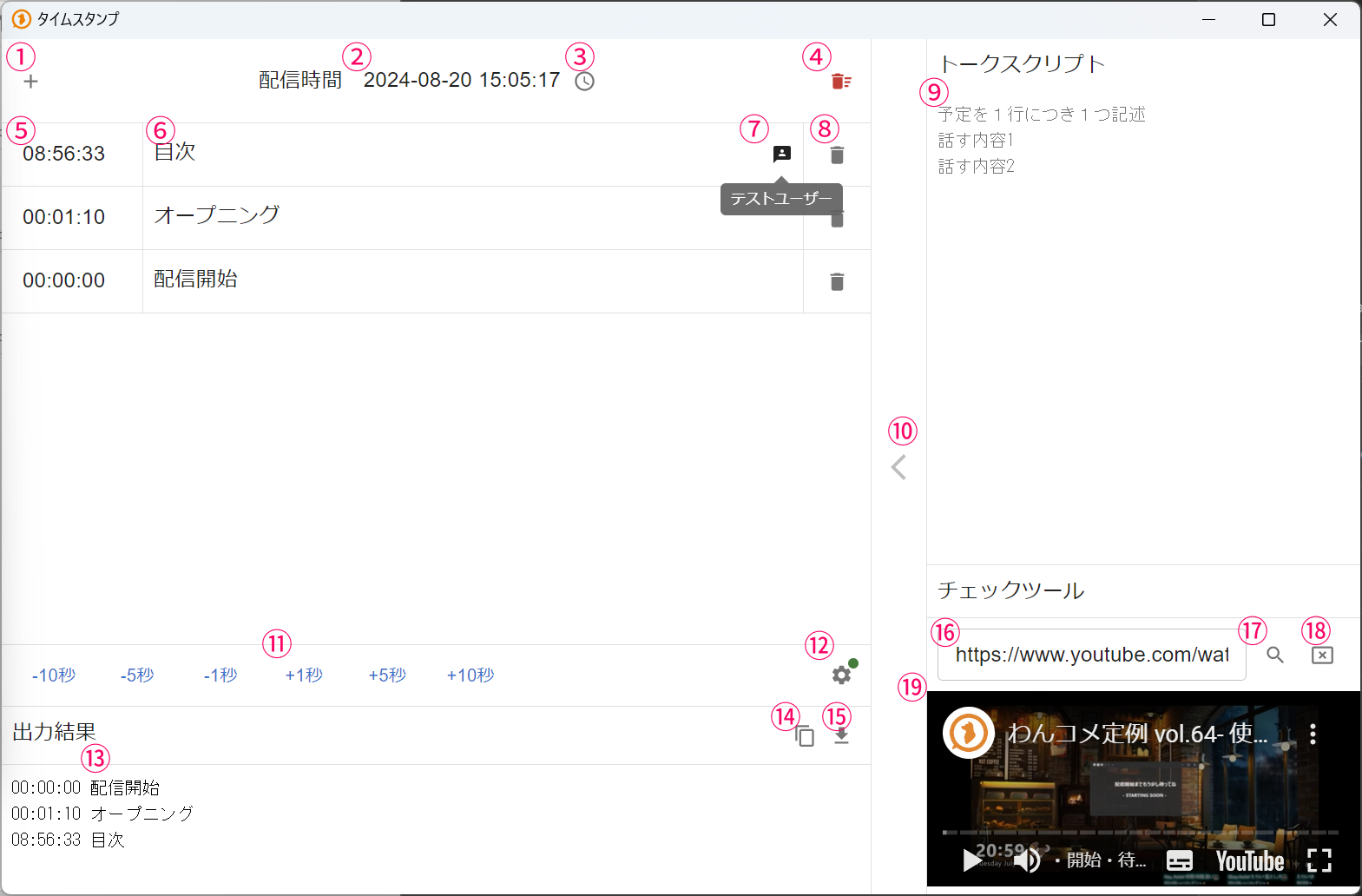 TimestampsStreaming timeContentsOpeningTestUserOutput Result00:00:00 Stream start00:01:10 Opening08:56:33 ContentsTalk ScriptWrite one schedule item per lineTalk topic 1Talk topic 2Check Tool
| ① Add timestamp | Add a new timestamp row It's set to the current time minus the streaming time from ② |
| ② Streaming time | The base streaming time |
| ③ Reference stream | Automatically sets the streaming time of the specified stream into the streaming time field in ② |
| ④ Clear | Delete all timestamps |
| ⑤ Timestamp time | The time of the timestamp |
| ⑥ Timestamp content | Enter the content of the timestamp here |
| ⑦ Username | Timestamps received via comments show the author name here |
| ⑧ Delete | Delete the specified timestamp |
| ⑨ Talk Script | Lets you prepare in advance the content you plan to insert as timestamps Write one item per line, then use the button in ⑩ to insert it as a timestamp |
| ⑩ Insert from Talk Script | Inserts the topmost item in the Talk Script as a timestamp |
| ⑪ Timestamp adjustment | Shifts the time of all timestamps by the amount clicked |
| ⑫ Settings | Opens the settings for the Timestamps feature |
| ⑬ Output result | The completed timestamps |
| ⑭ Copy | Copies the completed timestamps to the clipboard |
| ⑮ Download | Downloads the completed timestamps as a text file |
| ⑯ Check tool URL | Enter a YouTube archive URL to play it in the preview area While playing, selecting a point on the timeline automatically jumps to that position so you can check it |
| ⑰ Load URL | Loads the video entered in the URL field |
| ⑱ Remove video | Removes the preview display |
Settings
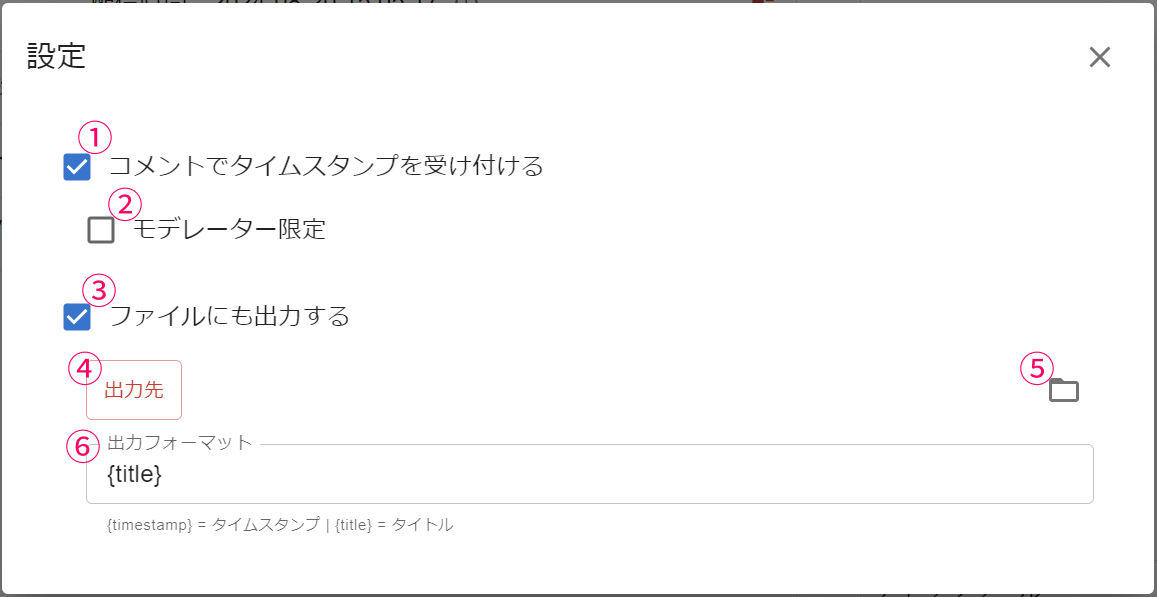 SettingsComments Can Accept Timestamps.Moderators OnlyOutput To A File As Well.Output DestinationOutput Format
| ① Accept timestamps via comments | Allows timestamps to be posted via comments See the posting format below for the required format |
| ② Moderators only | Restricts timestamp comments to moderators |
| ③ Also output to file | Outputs the timestamp results as text to the destination specified in ④ |
| ④ Output destination | Specifies the folder to output timestamps to |
| ⑤ Open folder | Opens the folder specified as the output destination |
| ⑥ Output format | The format used when outputting the timestamp file |
Posting format
When accepting timestamps via comments, use the following comment posting formats.
Use the comment's posting time as the timestamp
T Timestamp content
Use a specified time as the timestamp (time zone differences are not accounted for)
T 21:23:55 Timestamp content